
Adda247 · EdTech
Live Class Module
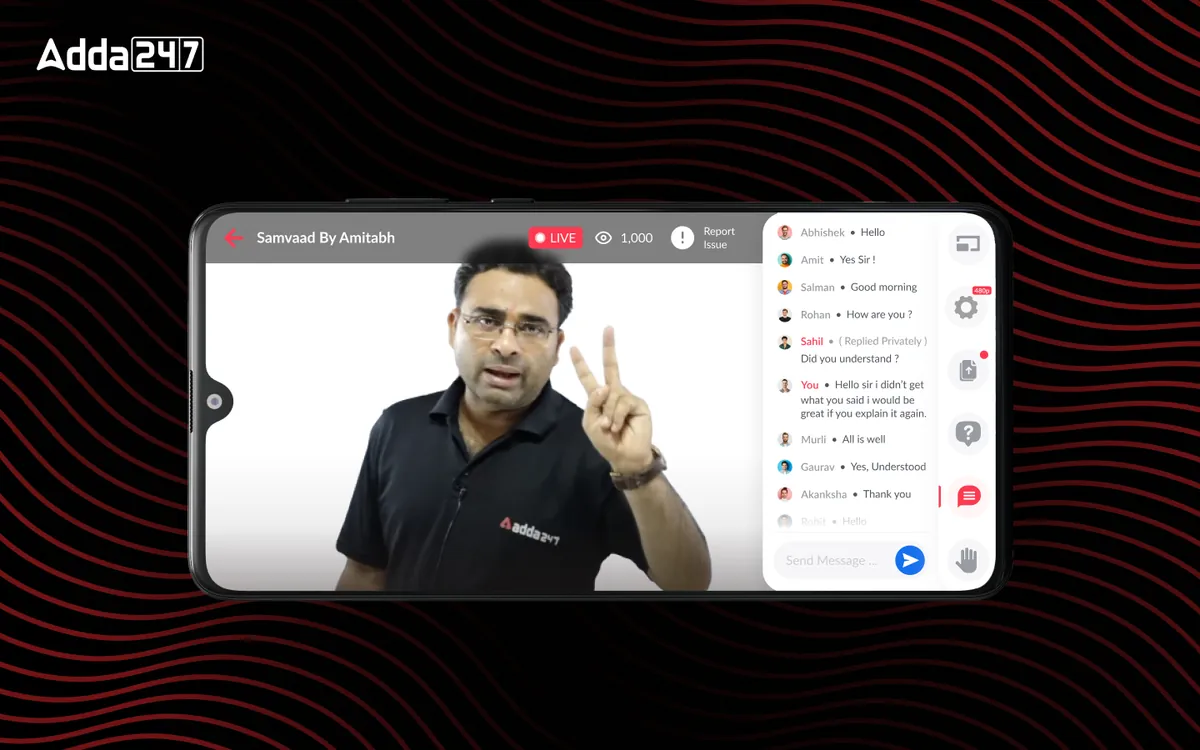
In-house live streaming module replacing third-party services — built for real-time interaction, content sharing, and meaningful student-teacher engagement.
Overview
The Challenge & Opportunity
Adda 247 relied on third-party streaming services for live classes, which created a fragmented learning experience. Students had to switch between apps, engagement was passive, and the platform had no control over the streaming quality or features. We designed a fully integrated in-house live class module that transforms passive video watching into active, interactive learning sessions — complete with real-time Q&A, in-class polls, resource sharing, and attendance tracking.
- Tools
- Figma, Prototyping
- Category
- EdTech
- Services
- Product Design, Interaction Design, Real-time UX
Problem statement
How might we turn a live class from something students passively watch into something they take part in, on a phone and a patchy connection, inside Adda247's own app?
Empathize
Who we designed for
Most students joined live classes from phones, many from tier-2 and tier-3 cities. The teacher and the student both needed the class to feel two-way.
Students in class
Want to ask doubts without interrupting everyone, keep up on a small screen, and catch up later if they miss a class.
Teachers
Want to check understanding mid-class, share material and see who is following, without leaving their teaching flow.
Adda247
Needed live classes, a key premium feature, to work inside its own product rather than on a third-party tool.
Pain points
Students joined, watched briefly and left; there was no reason to stay engaged.
There was no way to share PDFs, slides or practice questions during a session.
Teachers could not gauge comprehension or see who was struggling.
Attendance was not tracked, so there was little accountability for showing up.
The Problem
What Needed to Change
Disconnected, passive streaming
Third-party streaming was unreliable, expensive, and completely disconnected from the learning platform. Students would join a Zoom-like call, passively watch the teacher, and have no way to interact meaningfully with the content being taught. There was no mechanism for teachers to share PDFs, slides, or practice questions during the live session — they had to upload materials separately, creating a disjointed experience.
Short sessions in long classes
Engagement metrics were alarming: average session duration was only 12 minutes despite classes being 60-90 minutes long. Students would join, watch briefly, and leave — there was no reason to stay engaged. Teachers had no way to gauge comprehension in real-time, ask poll questions, or identify which students were struggling. The lack of integrated attendance tracking also meant there was no accountability or motivation for consistent participation.
Cost without the premium payoff
From a business perspective, the third-party streaming costs were significant — eating into margins on a per-student basis. More critically, the poor live class experience was a major factor in low conversion from free to paid tiers, since live classes were a key premium differentiator that wasn't delivering on its promise.
Design Process
How We Approached It
- Phase 01
Discovery & Research
We studied leading streaming platforms — Zoom, Google Meet, Twitch, and proprietary EdTech solutions like Unacademy and BYJU's — to understand the landscape of live learning interfaces.
We conducted interviews with 30 teachers and 100 students to map their ideal live class experience. Key finding: teachers wanted tools to check comprehension mid-class, while students wanted the ability to ask doubts without interrupting the flow. We also analyzed bandwidth constraints across tier-2 and tier-3 cities where most users lived.
- Phase 02
Information Architecture
We designed an interaction model that supported five parallel activities: video streaming, live chat, Q&A queue, resource sharing, and poll/quiz participation.
The challenge was fitting all of this into a single screen without overwhelming the user. We created a priority-based layout system where the most relevant panel expands based on context — when the teacher launches a poll, the poll panel auto-expands; when a doubt is being answered, the Q&A panel takes focus. Attendance tracking ran silently in the background.
- Phase 03
Wireframing & Prototyping
We built interactive prototypes testing three different layouts for the video + content + chat trifecta.
Layout A was a traditional sidebar chat; Layout B used a bottom drawer for interactions; Layout C employed a floating panel system. We tested each with 15 students in simulated live class conditions. Layout C won — students appreciated the ability to resize and reposition panels based on their preference. We also prototyped the teacher-side interface, ensuring they could manage polls, resources, and Q&A without interrupting their teaching flow.
- Phase 04
Visual Design & Handoff
We created adaptive layouts optimized for mobile-first experience, since 78% of students attended live classes from phones.
The mobile design used a tabbed interface switching between video, chat, and resources — keeping each context clean and focused. Bandwidth optimization was a key design consideration: we designed graceful degradation states for low-bandwidth scenarios, including audio-only mode with slide sync. The handoff package included 45 screens, micro-interaction specifications, and edge-case documentation for network interruptions and reconnection flows.
The Solution
What We Built
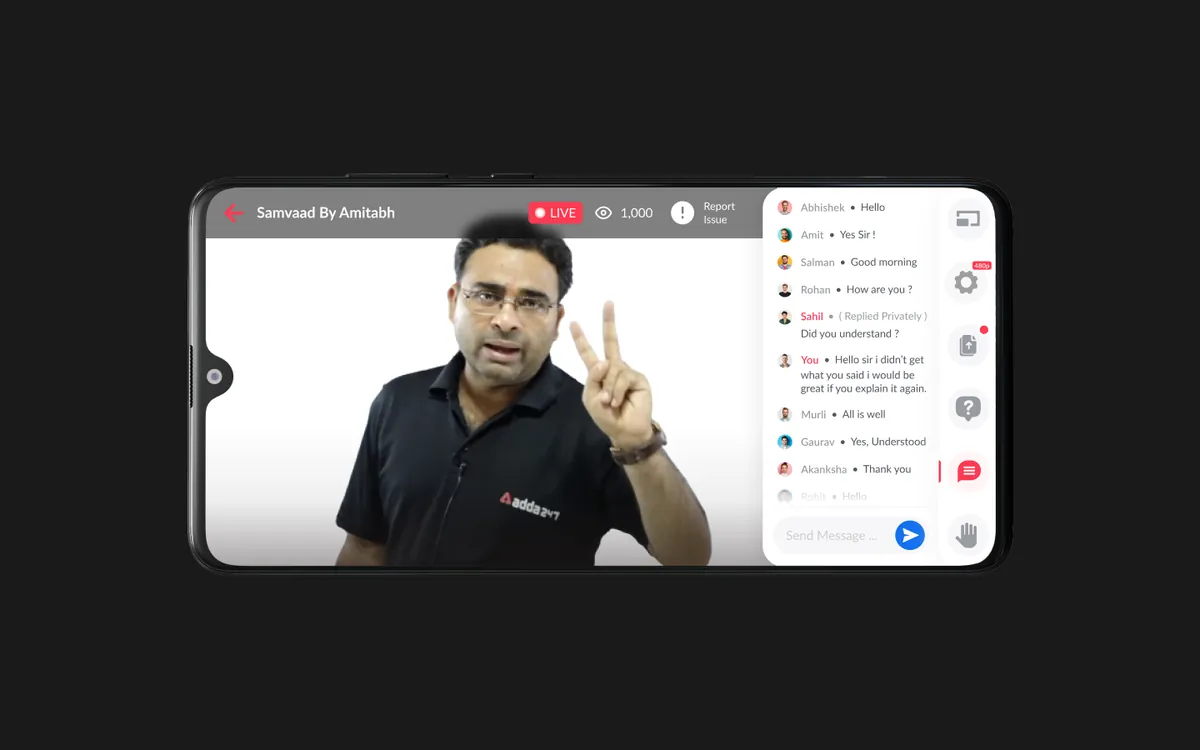
A fully integrated live class experience that transforms passive video watching into active, participatory learning. The interface adapts fluidly between teaching modes — lecture, Q&A, quiz, and resource sharing — with each mode optimizing the screen layout for the current activity. Teachers have a dedicated control panel for managing class flow, launching polls, pinning important messages, and tracking student engagement in real-time.
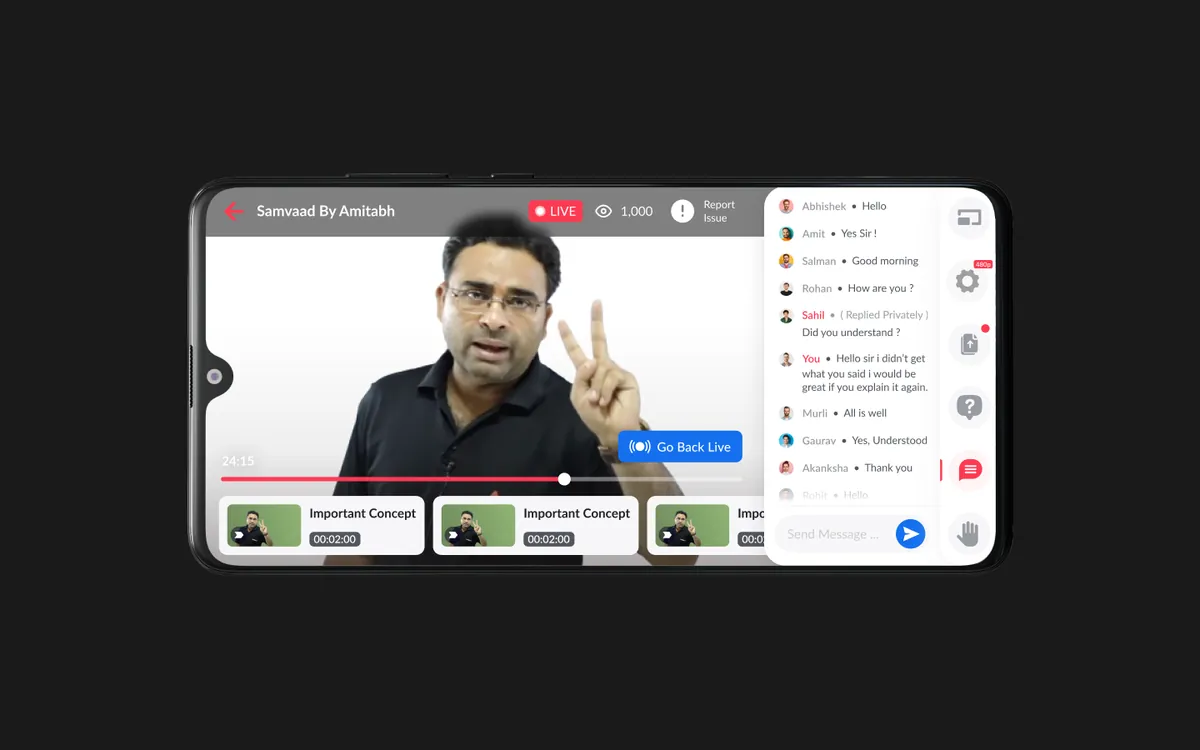
The recording and playback system captures not just the video but the entire interactive experience — including chat timeline, poll results, and shared resources — so students who missed the live session get a near-identical experience during replay. Smart notifications remind students of upcoming classes, and a post-class summary automatically generates highlights and key takeaways.
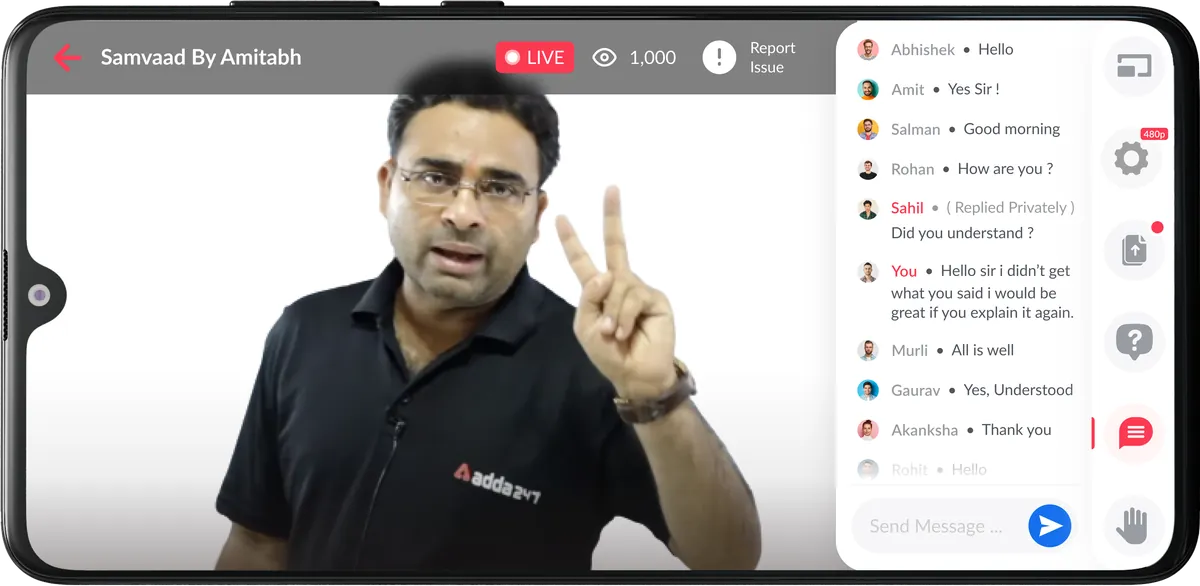
Live Doubt Resolution
A structured Q&A queue where students submit doubts, upvote popular questions, and get answers without disrupting the class flow for everyone.
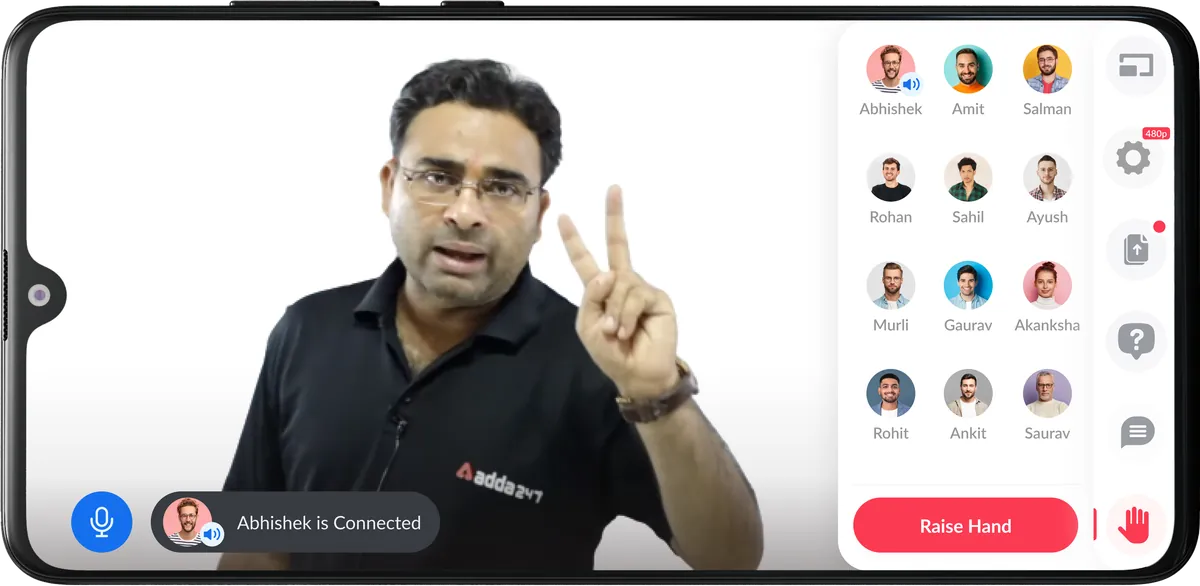
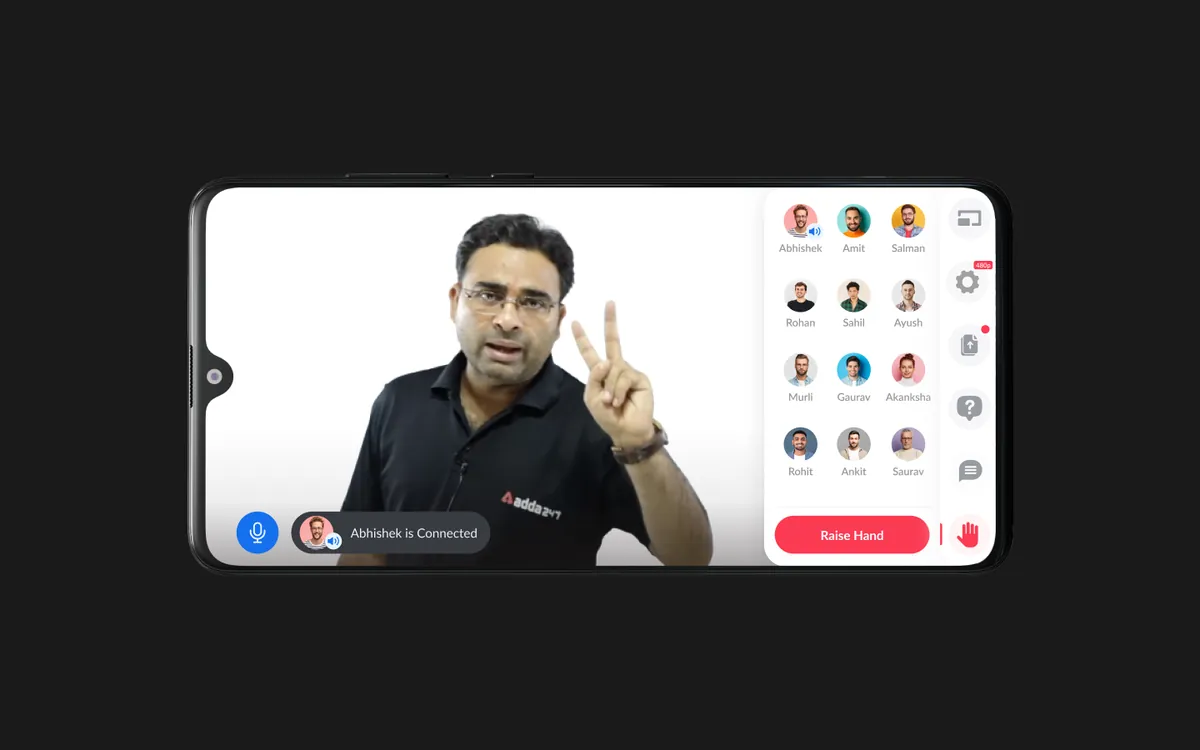
Raise a hand, then take the mic
When students want to speak, the chat makes way for the class roster. The teacher brings one student on air and everyone can see who is connected, so a doubt becomes a short conversation instead of a typed queue.
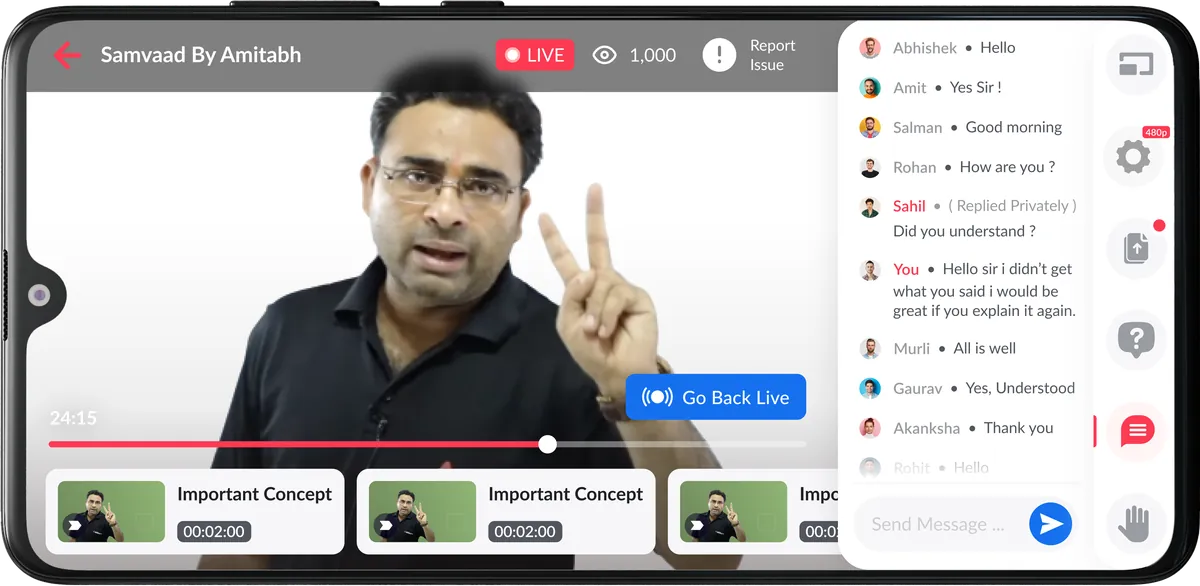
Recording & Playback
Full-fidelity recording capturing video, chat, polls, and resources in a synchronized playback experience — with speed controls and chapter markers.
Design Highlights
In-class Polls & Quizzes
Teachers can launch instant comprehension checks during the session. Results appear in real-time, letting teachers adjust pace based on understanding levels.
Resource Sharing
Teachers share PDFs, slides, and practice questions directly within the class interface. Students can bookmark, download, and annotate shared materials in real-time.
Attendance Tracking
Automated attendance based on active participation time, not just join/leave timestamps. Streak tracking motivates consistent class attendance.
Multi-device Support
Seamless experience across phone, tablet, and desktop with responsive layouts. Start on your phone during commute, continue on desktop at home.
Gallery
The live class, screen by screen
Frequently asked questions
What is Live Class Module?
In-house live streaming module replacing third-party services — built for real-time interaction, content sharing, and meaningful student-teacher engagement.
What problem did Live Class Module solve?
Third-party streaming was unreliable, expensive, and completely disconnected from the learning platform. Students would join a Zoom-like call, passively watch the teacher, and have no way to interact meaningfully with the content being taught. There was no mechanism for teachers to share PDFs, slides, or practice questions during the live session — they had to upload materials separately, creating a disjointed experience. The question we set out to answer: How might we turn a live class from something students passively watch into something they take part in, on a phone and a patchy connection, inside Adda247's own app?
How did Designit approach Live Class Module?
We worked in 4 phases: Discovery & Research; information architecture; wireframing & prototyping; visual design & handoff. We studied leading streaming platforms — Zoom, Google Meet, Twitch, and proprietary EdTech solutions like Unacademy and BYJU's — to understand the landscape of live learning interfaces.
Should an EdTech platform build its own live class tool or use Zoom?
If live classes are part of what students pay for, owning the experience matters. Adda247 moved from third-party streaming to an in-house module so chat, doubts, resources, polls, attendance and replays could all live inside the product students already use.
What features does a live class app need?
At minimum: reliable video, chat, a way to raise doubts without derailing the class, in-class polls or quizzes, resource sharing, attendance and recordings. The design work is in fitting them on one small screen, which is why panels here expand based on what is happening in class.
How do you increase engagement in online live classes?
Give students something to do: quick polls, a doubt queue, raise-hand to speak, and visible markers for important concepts. Teachers also need to see understanding in real time so they can adjust pace.
How do you design live classes for low-bandwidth users?
Plan for degraded states from the start. The module includes graceful fallbacks such as audio-only mode with slide sync, and clear reconnection flows for network interruptions.
How should class recordings work?
A recording should replay the class, not just the video. Here the replay includes the chat timeline, polls and shared resources, with markers for important concepts and a way to jump back to live.
How long does a Designit engagement take?
A Design Sprint is delivered in 5 business days. Full product design engagements run 4–12 weeks depending on scope. Monthly retainers are ongoing, with one active request at a time and a 24-hour response time.
Which regions does Designit work with?
Designit is based in Noida, India, and works with clients in India and the UAE; we also take on projects for teams in the United States and the United Kingdom. All communication is in English, and invoices are in the client's market currency: INR in India, USD in the US, GBP in the UK, and USD or AED in the UAE. Working hours overlap with EST and PST for US teams and with GMT for UK teams, so scheduled calls land inside a normal working day on both sides.
More projects
Keep exploring
Adda247
My Content
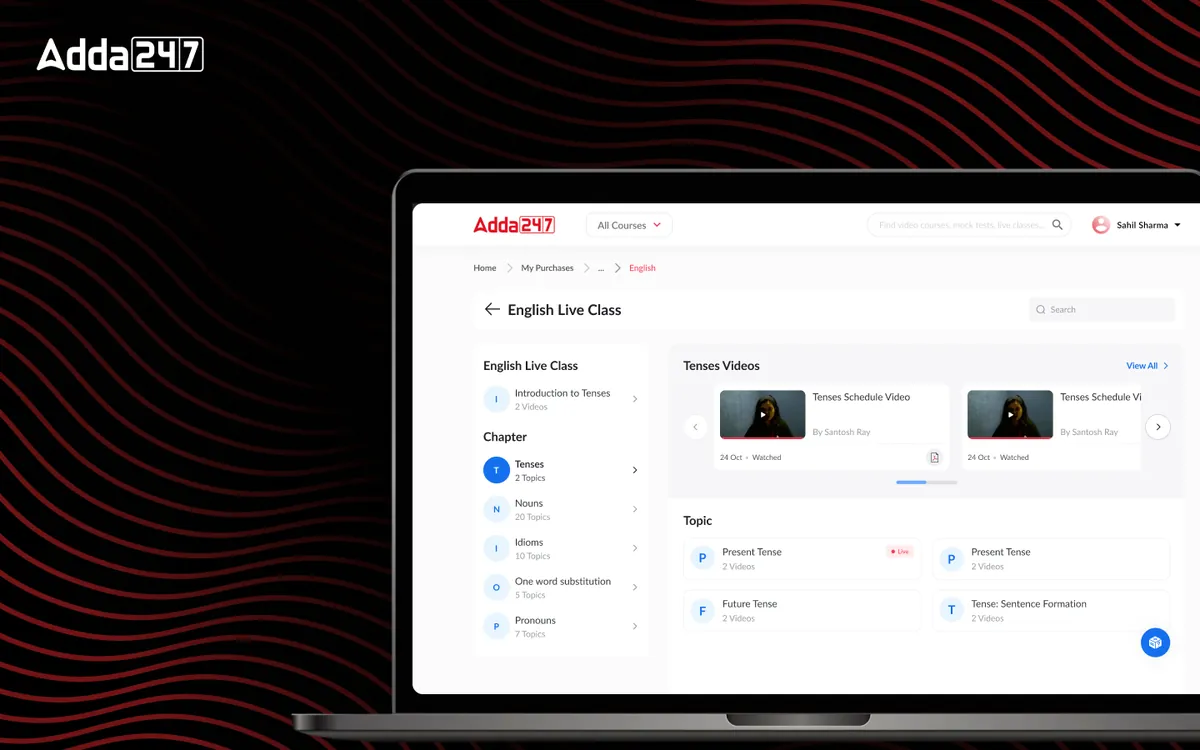
Purchased courses reorganised by subject and topic, with progress learners can see.
View case study
Adda247
Homepage Revamp
A cluttered feed turned into a home organised around Watch, Practice and Read.
View case study
Kelp Global
Deals Module
Every deal's one-pager, IC notes, valuation and documents in one place, with companies compared side by side.
View case studyHave a similar problem?
Tell us what is not working. We'll tell you where we would start, and whether we're the right partner for it.